Ticks
Tick removal, identification and prevention guidance
Submit a tick photo for identification
Ticks are small arachnids that can bite humans and animals. Some ticks can carry germs that cause illness. These are called tick-borne diseases.
Knowing your risk for Lyme disease and other tick-borne diseases starts with knowing what type of tick it is. Not all ticks spread disease, and identifying the tick helps determine your level of risk and whether any follow-up is needed.
What to do if you find a tick
If your find a tick attached to you or your pet:
- Remove it as soon as possible using tweezers or a tick remover. Follow these tick removal instructions:
- Submit the tick for identification
- Take a clear photo of the tick and send it to us using our Online Tick Photo Submission Form.
- Need help getting a good shot of your tick? Check out our tips for getting a good tick photo below.
- While waiting for a response, don’t throw the tick away. Place it in a small container with rubbing alcohol.
The tips below are intended to help you take clear photos at the right angle to help us to identify your tick quickly. If the photos are not clear and do not show the right angle, we may need to contact you to ask for more photos.
How should I take the photo?
Make sure your photo is well lit – either outside or under a lamp.
Use tweezers to place tick on a light coloured, flat surface.
What angle should I take the photo from?
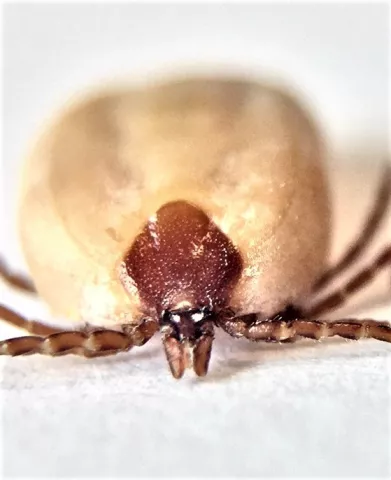
For a tick that appears swollen: Take the picture from the front and focus on the face and shield area of the tick. See the example photo below. In this photo, the shield is the dark area shaped like a diamond with rounded edges. For different tick species the shield may look different, but will be in the same location. It is important that the shield is clear in the photo.)
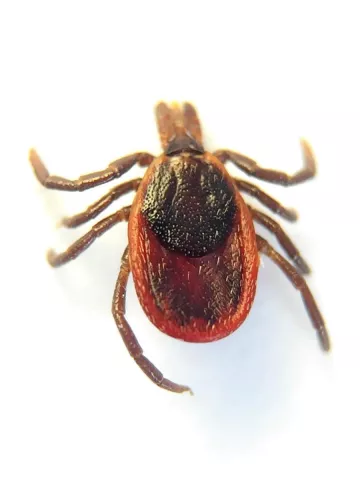
For a tick that appears to be flat (not swollen): Take the photo from above looking down at the tick’s back. See the sample photo below.
How do I get a good close up photo?
For some tips on taking a close up photo of small objects using a phone, check out these tips: How to Take a Close Up Photo with a Smartphone. One key tip is to first zoom in using the phone’s screen before taking the picture, pause to allow the camera to refocus, and then take the picture.
Take several photos and choose the best few to submit.
You can crop the image and adjust the lighting to make the tick appear as clear as possible.
Does it matter what device that I use?
It’s okay to use any device that you have available to you. When possible, consider the following:
- Cell phones are generally a great choice for taking photos.
- If you can, avoid using a tablet. Tablets often have lower quality cameras and their larger size means that the tablet is more likely to cast a shadow on the tick.
- If your digital camera has a macro setting or lens and you are familiar with how to use it, it’s a great choice. Otherwise, cameras on phones are often better than digital cameras.
How do I submit my photo?
Visit our Tick Photo Submission form and follow the instructions.
Note: We use tick photos to track blacklegged ticks in our area. We do not test ticks for diseases.
If you have concerns about a tick bite, contact your healthcare provider or local pharmacist (or veterinarian for your pet) immediately.
Never:
- Flick or scratch an attached tick
- Use petroleum jelly, heat, or nail polish to remove a tick (these take too long to work)
- Remove a tick while holding it around the middle (abdomen)
- Burn an attached tick
These methods increase the risk of infection.
How to prevent tick bites
- Wear light-coloured clothing so ticks are easy to see
- Cover up by wearing closed footwear and tucking pants into socks
- Use a repellent that contains DEET or Icaridin and follow the manufacturer’s directions
- Perform full-body checks on yourself, children, and pets
- When you get home, put your clothes in the dryer on high heat for at least 10 minutes before washing them
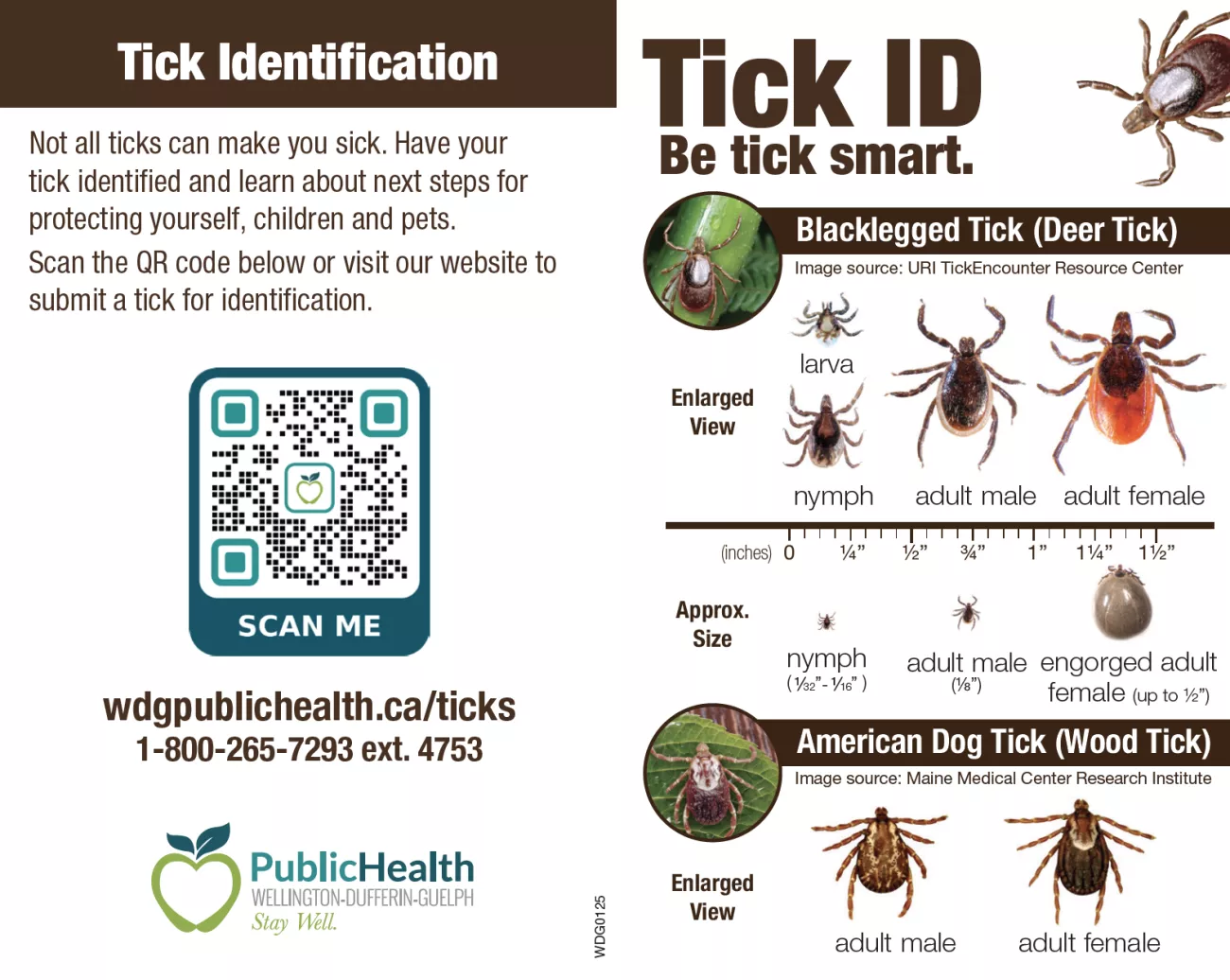
Carry our Tick ID card (PDF) with you for easy reference.